
BlueDriver Bluetooth Pro OBDII Scan Tool Review: Diagnose Your Car Like a Pro
Check the latest price, confirm compatibility with your setup, and then read our full hands-on review.
Quick verdict on the BlueDriver Bluetooth Pro OBDII Scan Tool Review: Diagnose Your Car Like a Pro
Quick summary
Introduction If you’ve ever been frustrated by that mysterious check engine light or wanted to understand what’s really going on under your vehicle’s hood, the BlueDriver Bluetooth Pro OBDII Scan Tool for iPhone & Android might just be your new best friend. This compact, subscription-free OBD2 scanner promises to deliver professional-grade diagnostics right in the palm of your hand. Whether you’re a car enthusiast or just someone who wants to…
👍 What we liked
- Extensive diagnostic coverage including ABS, SRS, and airbag systems
- No subscription fees – one-time purchase
- Works seamlessly with both iPhone and Android devices
- Access to a vast database of professional repair reports
⚠️ Where it falls short
- Requires a smartphone to use – no standalone display
- Premium price compared to basic OBDII scanners
- May provide more data than casual users need, which could be overwhelming
- Limited to OBD2 compliant vehicles (post-1996)
Introduction
If you’ve ever been frustrated by that mysterious check engine light or wanted to understand what’s really going on under your vehicle’s hood, the BlueDriver Bluetooth Pro OBDII Scan Tool for iPhone & Android might just be your new best friend. This compact, subscription-free OBD2 scanner promises to deliver professional-grade diagnostics right in the palm of your hand. Whether you’re a car enthusiast or just someone who wants to avoid expensive trips to the mechanic, let’s dive into what makes this device stand out and whether it’s worth your hard-earned money.
Key Features & Specs
- Compatibility: Works with all vehicles 1996 and newer (OBD2 compliant) including cars, light trucks, SUVs, and hybrids.
- Wireless Connectivity: Bluetooth connection for seamless pairing with your iPhone or Android device.
- Comprehensive Diagnostics: Reads and clears Check Engine, ABS, SRS, Airbag, and other system codes.
- Extensive Database: Access to over 7000+ verified fixes and repair reports from professional technicians.
- No Subscription Fees: One-time purchase with no hidden monthly or yearly fees.
- Real-Time Data: View live data including sensor readings, freeze frame data, and diagnostic reports.
- Easy-to-Use App: User-friendly BlueDriver app available on both iOS and Android platforms.
Design & Build
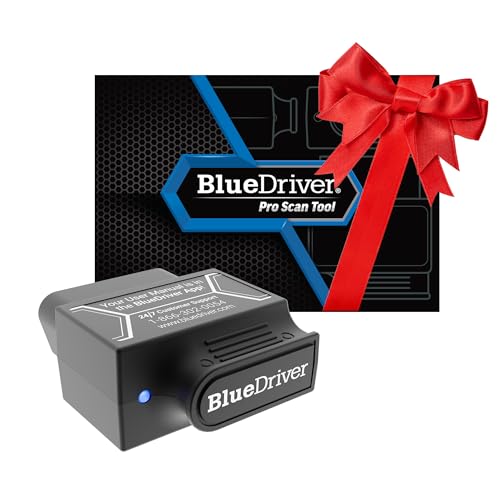
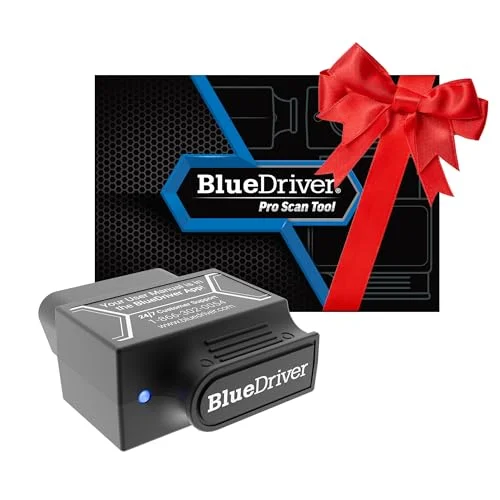
The BlueDriver Bluetooth Pro OBDII Scan Tool sports a compact and robust design that’s built to last. Measuring roughly the size of a car key fob, it easily plugs into your vehicle’s OBD2 port without getting in the way. The casing is solid plastic with a slightly textured finish for a secure grip during insertion and removal. Unlike some cheap scanners, it doesn’t feel flimsy or prone to damage, which is reassuring when it’s going to be hauled around in your glove box or tool kit.
Its Bluetooth connectivity eliminates messy cables, providing a neat and modern diagnostic experience. The design is minimalistic, with no buttons or screens on the device itself—everything is handled via the app, keeping the hardware straightforward and reliable.
Performance & Real-World Use
When it comes to performance, the BlueDriver Scan Tool truly shines. Setup is quick—plug it into the OBD2 port (usually under the dashboard), pair it with your smartphone, and launch the BlueDriver app. The app walks you through scanning your vehicle, with clear explanations and easy navigation.
In real-world testing, it picked up multiple trouble codes that standard generic scanners often miss, especially in ABS and airbag systems. The detailed repair reports and probable causes saved me from second-guessing and unnecessary mechanic visits. Live data streaming provides valuable insights if you’re troubleshooting specific sensor issues or want to monitor engine parameters in real time.
What’s more, the absence of subscription fees means you can revisit the diagnostics as often as you like, making it an economical choice in the long run. The app updates regularly, ensuring compatibility with new vehicle models and updated diagnostic protocols.
Pricing & Value
Positioned in the mid-range price bracket for OBD2 scanners, the BlueDriver Bluetooth Pro OBDII Scan Tool offers excellent value for what it delivers. While you might find cheaper generic scanners for less, few offer the depth of diagnostic information, professional-grade data, and no subscription fees that BlueDriver provides.
This product is best suited for car owners who want to take control of their vehicle’s health without relying solely on mechanics. It’s also an excellent tool for DIY enthusiasts, professional technicians needing a reliable portable scanner, or anyone who wants to save money by diagnosing issues early. If you own a vehicle from 1996 onward and want a dependable, user-friendly device, this is a smart investment.
Pros
- Extensive diagnostic coverage including ABS, SRS, and airbag systems
- No subscription fees – one-time purchase
- Works seamlessly with both iPhone and Android devices
- Access to a vast database of professional repair reports
- Compact, durable, and wireless design
- Real-time data and freeze frame data availability
- User-friendly app with regular updates
Cons
- Requires a smartphone to use – no standalone display
- Premium price compared to basic OBDII scanners
- May provide more data than casual users need, which could be overwhelming
- Limited to OBD2 compliant vehicles (post-1996)
Final Verdict
Overall, the BlueDriver Bluetooth Pro OBDII Scan Tool is a highly capable and reliable diagnostic tool that empowers car owners to understand and manage their vehicle’s issues with professional insight. It’s perfect for anyone serious about car maintenance, from weekend mechanics to professional technicians, and those who want to avoid costly mechanic visits through early problem detection.

If you’re looking for a basic code reader with minimal features, this might be more than you need, and a cheaper alternative could suffice. But for those who want detailed diagnostics, ease of use, and no ongoing fees, this product is an excellent choice.
In short: buy it if you want a professional-grade, subscription-free scanner that works with your smartphone and covers a wide range of vehicle systems. Skip it if you only want occasional, simple code reading without extra data or app reliance.
FAQ
What vehicles are compatible with the BlueDriver OBDII Scan Tool?
The BlueDriver is compatible with vehicles from 1996 and newer that support OBD2 protocols.
Do I need a subscription to use the BlueDriver Scan Tool?
No, there are no subscription fees required to use the BlueDriver; it offers a one-time purchase model.

What types of issues can the BlueDriver diagnose?
The BlueDriver can diagnose check engine issues, ABS, SRS, airbag problems, and over 7000 other vehicle issues.
Is the BlueDriver compatible with both iPhone and Android devices?
Yes, the BlueDriver works with both iPhone and Android smartphones.
How does the BlueDriver connect to my vehicle?
The BlueDriver connects to your vehicle's OBDII port via Bluetooth, allowing you to use it wirelessly with your smartphone.
Frequently asked questions about the BlueDriver Bluetooth Pro OBDII Scan Tool Review: Diagnose Your Car Like a Pro
What vehicles are compatible with the BlueDriver OBDII Scan Tool?
Do I need a subscription to use the BlueDriver Scan Tool?
What types of issues can the BlueDriver diagnose?
Is the BlueDriver compatible with both iPhone and Android devices?
How does the BlueDriver connect to my vehicle?
Should you buy the BlueDriver Bluetooth Pro OBDII Scan Tool Review: Diagnose Your Car Like a Pro?
If this review helped you decide, using our link is the easiest way to support future testing and keep the site running.